How to Use the GoHighLevel Mobile App?

Mastering marketing and client management on the move can transform business productivity when handled correctly. The GoHighLevel mobile app allows users to track leads, manage contacts, and automate follow-ups directly from smartphones and tablets.
Businesses can monitor campaign performance, schedule appointments, and communicate through email, SMS, and calls without using a desktop. Real-time notifications and reminders ensure that no task is missed, keeping teams efficient and responsive.
The mobile app brings the full functionality of GoHighLevel to handheld devices, allowing consistent workflow management anytime, anywhere. Keep reading to discover step-by-step guidance and practical tips to make the most of this mobile platform.
Download the GoHighLevel App and Log in To Your Account
Downloading the GoHighLevel mobile app is simple for both Apple and Android users. Apple users can open the App Store, search for “GoHighLevel,” and tap “Get” to install the app.
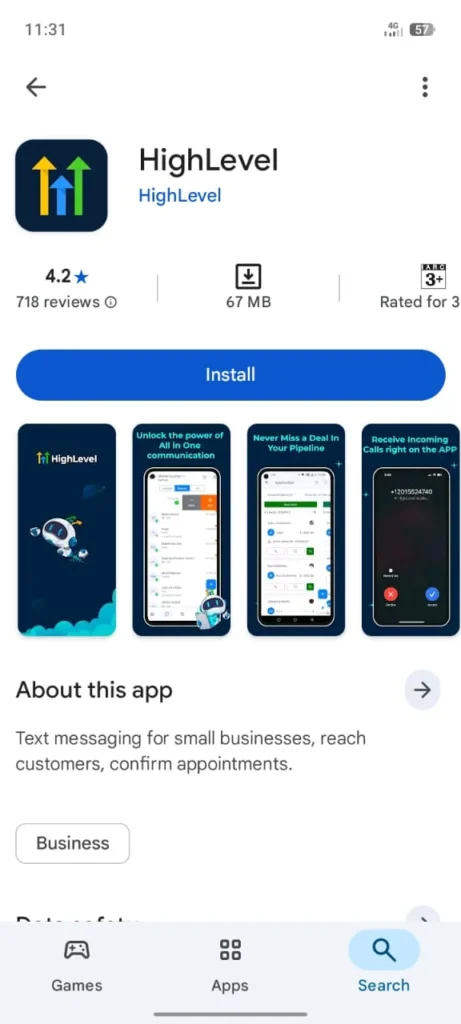
Android users should open the Google Play Store, search for “GoHighLevel,” and select “Install.” After installation, open the app to begin.
Enter your registered email address and password associated with your GoHighLevel account. Complete any two-factor authentication (2FA) steps if enabled.
Once logged in, users can access contacts, campaigns, and appointments directly from the app. Keep reading to learn how to navigate the dashboard and manage tasks efficiently.
Check and Discover the Application Interface
- Top Navigation: The top navigation bar allows users to switch between different workspaces and profiles easily. This feature ensures access to multiple accounts without logging out.
- Center Content Area: The central section of the app displays conversations, pipelines, and tasks. Users can view messages, track leads, and update project progress in a single location. This area provides real-time updates and status indicators for active campaigns.
- Bottom Navigation Bar: The bottom navigation bar provides quick access to key modules, including contacts, marketing campaigns, appointments, and reports. Users can switch between functions efficiently, improving workflow and response time.
Use the GoHighLevel Bottom Navigation Bar
The bottom navigation bar in the GoHighLevel mobile app allows fast access to the platform’s main sections. It simplifies movement between modules, improving efficiency for users managing multiple tasks simultaneously.
Home Dashboard in GoHighLevel
The Home tab serves as the central hub for your account activity. From this screen, users can:
- View a summarized overview of key activities for the selected workspace.
- Access recent conversations, messages, and pending tasks quickly.
- Use shortcuts to navigate to other essential tools, including pipelines, campaigns, and appointments.
The Home Dashboard centralizes information, enabling users to monitor progress and respond to updates efficiently.
Conversations Tab
The Conversations tab organizes all messaging activities in one place, providing a unified view of client interactions.
Within the Conversations section, users can:
- Access messages from SMS, email, and additional communication channels in a consolidated timeline.
- Select any contact to open a detailed conversation thread and review previous interactions.
- Respond to messages, archive conversations, or manage communications directly from the mobile app.
All updates within the Conversations tab remain synchronized with the GoHighLevel desktop platform, ensuring consistent records across devices and allowing seamless follow-up with leads and clients.
Opportunities and Pipelines Tab
The Opportunities or Pipelines tab provides a clear view of active deals and potential leads.
In this section, users can:
- Explore pipelines designed for mobile use, showing all deals at a glance.
- Identify the current stage of each opportunity, enabling quick assessment of progress.
- Open any opportunity to review detailed information, including associated tasks, notes, and recent activity.
This tab helps users track sales performance, prioritize high-value leads, and maintain organized workflows directly from the mobile app, ensuring timely updates and informed decision-making.
Tasks and Activity
The Tasks or Activity section keeps daily responsibilities organized and accessible from the mobile app.
In this area, users can:
- Track all assigned tasks along with their deadlines to maintain productivity.
- Complete tasks directly within the app, ensuring updates reflect across the GoHighLevel platform.
- Add new tasks and link them to specific contacts, opportunities, or projects for contextual organization.
This section enables users to manage workloads efficiently, prioritize urgent actions, and maintain consistent progress on projects while working remotely or away from a desktop.
Contacts Management
The Contacts section provides a centralized location to view, organize, and manage all client and lead information.
In this section, users can:
- Search, filter, and sort contacts by name, status, or custom tags for quick access.
- Update contact details, add notes, or assign contacts to specific pipelines or campaigns.
- Import or export contact lists to maintain synchronization with the desktop platform.
This module ensures all client information remains up-to-date, supports targeted communication, and simplifies lead tracking for teams on the move.
Campaigns and Marketing Automation
The Campaigns tab allows users to monitor and manage marketing initiatives from mobile devices.
Users can:
- Review active email, SMS, and voice campaigns in a streamlined interface.
- Track performance metrics, including open rates, click-through rates, and engagement trends.
- Pause, resume, or adjust campaigns without accessing a desktop computer.
This feature ensures businesses maintain consistent marketing efforts, quickly respond to campaign performance, and make data-driven adjustments anytime.
App Settings and Notifications
The Settings section controls app preferences and notification management.
Users can:
- Configure notification preferences for tasks, messages, and pipeline updates.
- Adjust workspace settings, profile information, and account security features.
- Enable or disable push notifications for specific modules to focus on priority activities.
This area helps users personalize their mobile experience, maintain security, and ensure timely alerts for critical updates and tasks.
Conclusion
The GoHighLevel mobile app provides full access to marketing, sales, and client management tools from any location. Its organized interface, real-time updates, and synchronized features ensure efficient workflow and task management. Using the app consistently allows businesses to stay responsive, track progress, and manage campaigns effectively while on the move.