GoHighLevel Prospecting Tool: A Practical Guide to Finding and Converting Quality Leads

Consistent lead generation separates growing agencies from stagnant ones. The GoHighLevel Prospecting Tool addresses this challenge by identifying real businesses with measurable marketing gaps. According to Inc.com data, the United States has approximately 30.4 million small businesses. About 84 percent of these businesses do not use full marketing automation systems. Around 20.2 million businesses, equal to nearly 56 percent, also operate without a proper CRM or structured follow-up process.
That gap creates direct outreach opportunities when handled with structure and accuracy. The GoHighLevel prospecting tool organizes prospect data, filters decision makers, and supports outreach preparation in one system.
The process reduces guesswork and saves time; results depend on correct setup and intent-driven use. Keep reading to understand the exact process. Keep reading to see how qualified leads are identified and converted step by step.
What is the Prospecting Tool?
The Prospecting Tool is a software solution built to support structured lead discovery and early outreach activities. It helps businesses and agencies identify potential customers based on location, industry, and online presence.
The Prospecting Tool also generates marketing audit reports that highlight gaps in websites, listings, reviews, and follow-up systems. These reports provide clear talking points for outreach without manual research. The Prospecting Tool centralizes prospect data, audit insights, and contact preparation in one interface.
This unified process reduces manual effort and supports consistent outreach planning while keeping prospect qualification accurate and organized.
Who Should Use This Tool?
The Prospecting Tool suits professionals and organizations involved in client acquisition and outbound growth. The following groups commonly use this tool:
- Digital marketing agencies
- SEO agencies
- Web design agencies
- Marketing consultants
- Lead generation agencies
- Sales teams
- Business development managers
- SaaS companies
- Local service providers
- Freelancers offering marketing services
- Startup founders
- Growth managers
- Outreach specialists
- CRM-focused consultants
- Automation service providers
Each group uses the Prospecting Tool to identify prospects, assess marketing gaps, and prepare structured outreach activities.
How to Generate Reports Using GHL’s Prospecting Tool?
Let’s find out how to generate reports using the Propecting tool.
1) Open the Prospecting Tool
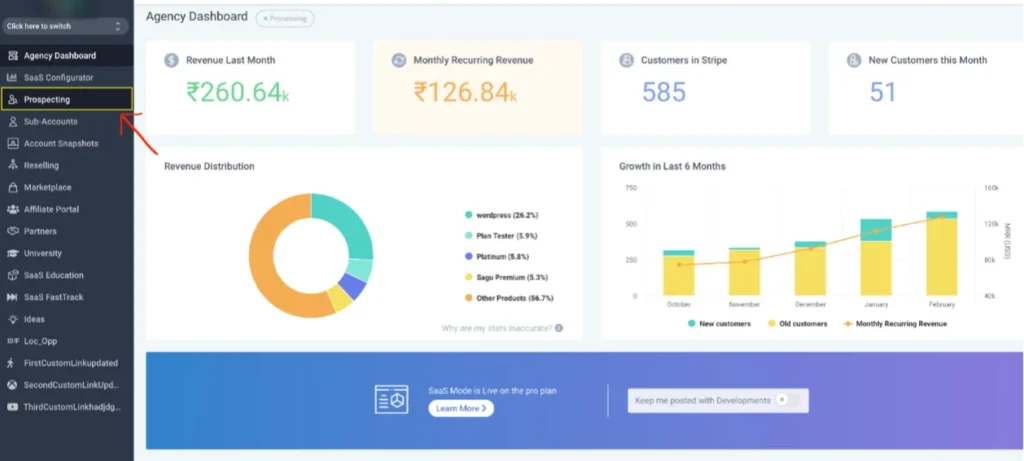
Open your web browser and log in to your GHL account. Go to the dashboard and click on the “Prospecting Tab” located in the left menu.
After that, you need to enable prospecting in a sub-account. You can do this with two methods. One is via Turning ON Prospecting in the Reselling Tab, and the second one is via deploying it in your Agency’s specific Sub Account.
Next, select the Marketing tab from the left-hand menu, then click the Prospecting tab in the top navigation bar. Advanced prospecting features, such as triggering automated workflows and saving leads directly to contacts, are available within Sub-Accounts.
You can also activate prospecting for any specific Sub-Account according to your needs, allowing focused lead management and streamlined outreach for each client or project.
2) Go to Search Option
Go to the “Add Prospect Button” option and click on it. This will open the search page, and there you can use multiple ways to make search leads.
- Keyword Search: Enter specific keywords related to services, industries, or business types to find relevant prospects.
- Location Search: Target prospects based on city, state, or region to focus outreach on specific geographic areas.
- Set Search Radius: Define a radius around a chosen location to expand or narrow the search area, ensuring leads fall within a practical distance for local services or campaigns.
Understanding Marketing Audit Reports for Effective Prospecting
A marketing audit report provides a clear overview of a prospect’s online presence, divided into two key areas: Listings and Reviews.
Listings
The listings section consolidates information from over 70 online directories, highlighting the total number of listings, their accuracy, and any missing entries.
Accurate and complete listings allow local businesses to remain visible across multiple platforms, helping customers locate business locations and verify operational status. Inconsistent or missing listings can result in lost traffic and reduced credibility.
Reviews
The reviews section evaluates a business’s online reputation, focusing on platforms like Google Business Profile (GBP) and Facebook.
These reviews provide insights into customer satisfaction, service quality, and public perception. A well-maintained profile with positive feedback supports trust and competitive positioning.
Google Business Profile data, including contact details, operating hours, and website links, remains essential for attracting and converting potential customers.
Tips for Effective Lead Outreach
Once prospects are identified, structured outreach increases the chances of conversion. Use personalized messages based on audit findings to address specific business gaps. Prioritize prospects with incomplete listings or poor online reviews, as these indicate higher potential for improvement.
Track interactions and schedule follow-ups consistently to maintain engagement. Automation features within GoHighLevel can streamline outreach, but manual adjustments enhance personalization and response rates.
Measuring Prospecting Success
Monitoring prospecting results helps refine strategies and improve ROI. Track metrics such as response rate, leads converted, and audit completion rate. Regularly review which industries, locations, or business sizes yield higher conversions.
Use insights to adjust search filters, outreach messaging, and follow-up timing. Reporting features in GoHighLevel provide visual dashboards that make performance evaluation clear and actionable.