
ClickFunnels Review

I first tested ClickFunnels in 2017 for my personal projects. I am still using this tool in 2026, and in this post, I will share my honest review.
However, ClickFunnels has mixed reviews from marketers. Some say it is the most convenient marketing tool as it combines all the tools like sales, ecommerce, and analytics. While some say that this tool is very costly compared to other tools available in the market.
Today, we will find out whether this platform is for you or if you should opt for other platforms. Let’s begin the guide.
ClickFunnels
ClickFunnels is an all-in-one platform that combines marketing, sales, ecommerce, and analytics tools in one place. It is a SaaS program that people use for sales funnels, converting visitors to paying customers, and improving their online business.
How does ClickFunnels work?
In 7 easy steps, I will explain how ClickFunnels works.
1. Funnel Goal Selection
These are the main and initial steps where a user chooses a reason for using this platform. It can be lead generation, webinar registration, product sales, or booking of a service.
2. Funnel and Landing Page Creation
Users can use ready-made templates for landing pages, check out pages, or sales pages. They can use a drag-and-drop builder to edit text, layouts, and images easily without any code.
3. Lead Capture
In this step, ClickFunnels collects the user data like their email addresses, names, and phone numbers using the opt-in forms. After that, this data can be used in combination with other platforms.
4. Sales Conversion
This is the step where your audience converts to paying customers. The tool moves the audience through structured steps such as sales pages, order forms, upsells, and downsells. This is where actual conversion happens.
5. Payment Processing
Now it’s time to collect the payments from your customers. For this, ClickFunnels allows you to use major payment gateways to receive payments.
6. Automation and Follow-Up
Once your visitor is converted, you need to keep them updated with some follow-ups. Send email sequences with the necessary information and after-sales guides.
7. Tracking and Optimization
Built-in analytics show traffic, conversions, and revenue. A/B testing is used to compare different page versions and improve performance.
ClickFunnels Pricing 2026
Before we dive into the detailed review of ClickFunnels, it is important to check out what the pricing plans are in 2026.
One thing is sure that this platform is not the most affordable option in 2026. The basic plan will cost you $81/month (saves $194/year) if you pay annually. However, if we consider it with different tools like analytics, landing page builder, course builder, domain name, or e-commerce tools, then this is a good deal.
Let’s have a look at the prices of ClickFunnels in 2026.
Launch — $81 per month
(Regular price $97 per month. Annual billing applies, with total savings of $194 per year.)
The launch package provides the essential features required to set up and operate an online business efficiently.
The Launch package includes:
- Unlimited sales funnels for a limited promotional period
- 1 workspace or sub-account
- Access for 2 team members
- Up to 10,000 contacts
- 50,000 emails per month
- 3 online courses
- 5 custom domains
- Unlimited website traffic
- Group onboarding sessions
- AI tools with a limit of 1 million words
- Standard support services
A free trial is also available, allowing new users to test the platform before subscribing.
Scale — $164 per month
(Standard price $197 per month. Annual billing applies, giving a total saving of $394 per year.)
The Scale package is designed for growing businesses that require advanced tools, higher limits, and increased control over their marketing and sales operations.
The Scale plan includes:
- Unlimited sales funnels for a limited promotional period
- 5 workspaces or sub-accounts
- Access for up to 5 team members
- Capacity for 75,000 contacts
- 300,000 emails per month
- 6 online courses
- Unlimited custom domains
- Unlimited website traffic
- Group onboarding calls
- AI tools with a limit of 2 million words
- Priority and live chat support
- Custom code editor
- Webhooks and full API access
A free trial option is available.
Optimize — $248 per month
(Regular price is $297 per month. This rate applies with annual billing, offering a total saving of $594 per year.)
The Optimize package is designed for professional marketers and established businesses that run high-converting funnels at scale. It offers advanced capacity, extended limits, and greater flexibility for growth.
The Optimize package includes:
- Unlimited sales funnels for a limited promotional period
- 10 workspaces or sub-accounts
- Access for up to 10 team members
- Support for 150,000 contacts
- 750,000 emails per month
- 10 online courses
- Unlimited custom domains
- Unlimited website traffic
- Group onboarding calls
- AI tools with up to 5 million words
- Priority and real-time chat support
- Custom code editor
- Webhooks and full API access
You can use the free trial for this package.
Dominate — $5,997 per year
(This is available on annual billing only.)
The Dominate delivers the highest level of features and support. It is built for large organizations and elite marketers who require maximum scale, advanced control, and premium assistance to lead their markets.
The Dominate package includes:
- Unlimited funnels for a limited promotional period
- 20 workspaces or sub-accounts
- Access for up to 20 team members
- Capacity for 400,000 contacts
- 1.2 million emails per month
- 20 online courses
- Unlimited custom domains
- Unlimited website visitors
- Group onboarding calls
- AI tools with a limit of 10 million words
- VIP support
- Custom code editor
- Webhooks and full API access
- 3 hours of private onboarding support
ClickFunnels Features
1) Drag-and-Drop Landing Page Builder
Landing page editor is what I pay attention to whenever I try a new marketing app. ClickFunnels has got the numbers here. The landing page editor is so impressive, as it is clean and easy to use.
With the help of annotations on elements, you can get information about each element instantly, like how to use them and how they work on mobile devices, etc.
My personal favorite feature is that you can use drag and drop landing elements to your page, like blog posts, custom HTML and JavaScript, images, content blocks, online courses, or drop-down menus, etc.
However, one thing that I don’t like is the sticking of some heavy elements while editing them.
2) Sales Funnels Builder
Sales funnels are not as user-friendly as the page builder. You will experience some difficulties if you are trying this feature for the first time. I am not saying that you will get stuck here forever, but you may find it not so super easy due to its workflow editor.
However, once you become familiar with the sales funnel features, you are going to make some amazing funnels without extra effort.
What I like most are the following features:
- Visual Funnel Mapping
- Pre-Designed Funnel Templates
- Step-Based Funnel Control
- Built-In Conversion Tracking
- A/B Testing Capability
3) Style Editor
Designing a landing page is directly proportional to the style editor. And ClickFunnels has a style editor that allows users to create landing pages that convert customers.
Go to the “Style Guide” that is the style editor of ClickFunnels, and you can see the following items that you can edit and stylize.
- Buttons
- Fonts
- Boarders
- Colors
The style guide helps maintain consistent branding across all funnel pages, which supports a professional user experience.
Users can easily adjust these elements to match their brand identity without requiring technical design skills.
4) Pop-Up Creator
Every marketer uses the pop-up to enhance the conversion rate. You need to use this software to make your entire operation successful.
You can not only use the built-in templates to create your pop-ups, but you can also create them from scratch. Customize your pop-ups to just the way you like it or your brand resembles.
How to Use ClickFunnels for your First Sale?
Making your first sale with ClickFunnels begins with understanding how to structure a funnel that guides visitors from awareness to purchase.
Before diving into the step-by-step process, it is important to plan your offer, create compelling pages, and set up the necessary integrations for payments and email follow-ups.
A clear strategy ensures that every element of your funnel works together to convert the audience into customers efficiently.
Let’s start the complete procedure!
1) Register Your Free ClickFunnels Account
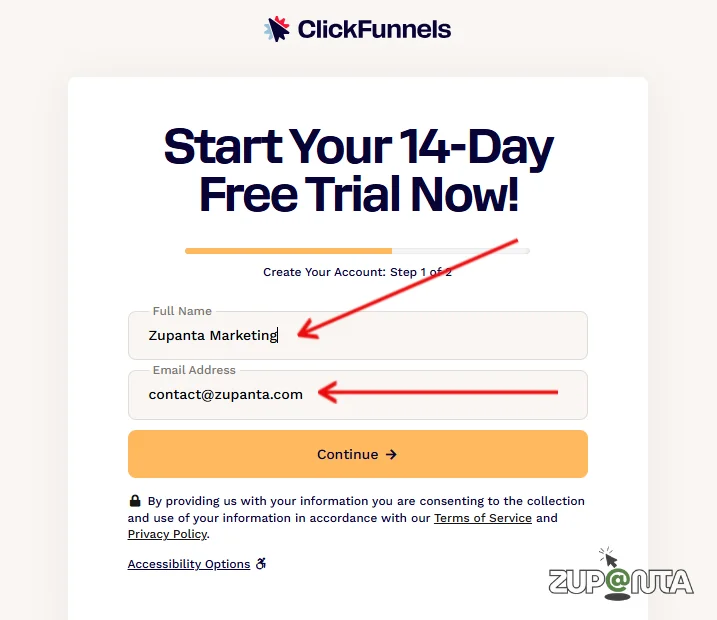
Register a ClickFunnels account if you don’t have one already. For this, you need to:
- Go to the ClickFunnels official website from here.
- Fill out the registration form with your full name and email address.
- Click on the “Continue” button and go to the next page.
- On this page, you need to enter your credit card details to activate your free trial.
- Once your trial is activated, you can start using the free ClickFunnels.
2) Set Up Your Domain
Once your free trial is created, you need to click on the welcome email to set a password for your account.
Now enter your first name, last name, phone number, and select your time zone, and then click on the “Next” button.
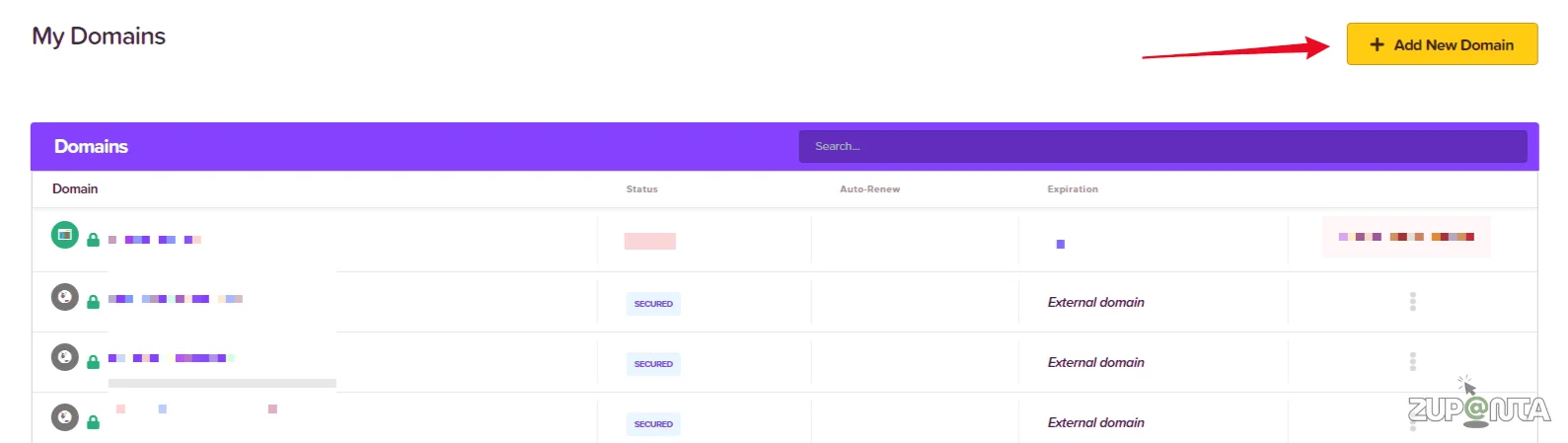
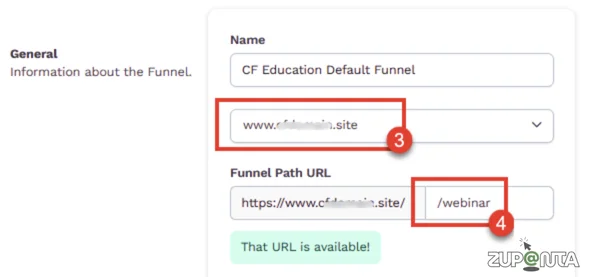
Set a name for your project and also add a domain name where you can host your landing pages.
3) Create Your Landing Page
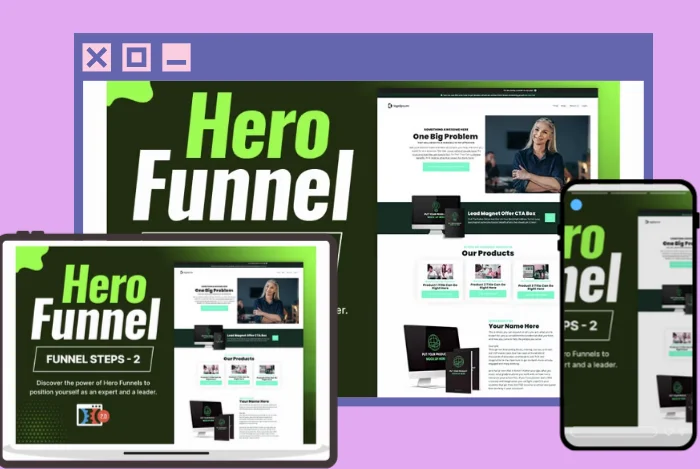
Before you launch your landing page, you need to choose a theme for it. ClickFunnels provides 4 free themes that you can choose for your first project.
After choosing a theme, you need to customize it before you use it. So click on the “Customize Now!” button.
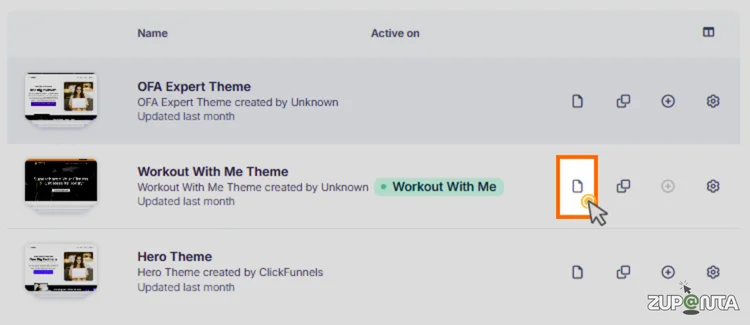
Note: ClickFunnels has no preview of how your theme looks until you install it manually. Also, the installation time is so long.
This process drives me crazy. It can take up to 3 to 4 minutes to just install the theme. So keep waiting…
4) Customize Styling of your Page
Now it is the time to customize your landing page. However, you can skip this step if you are already fine with the pre-built template and style.
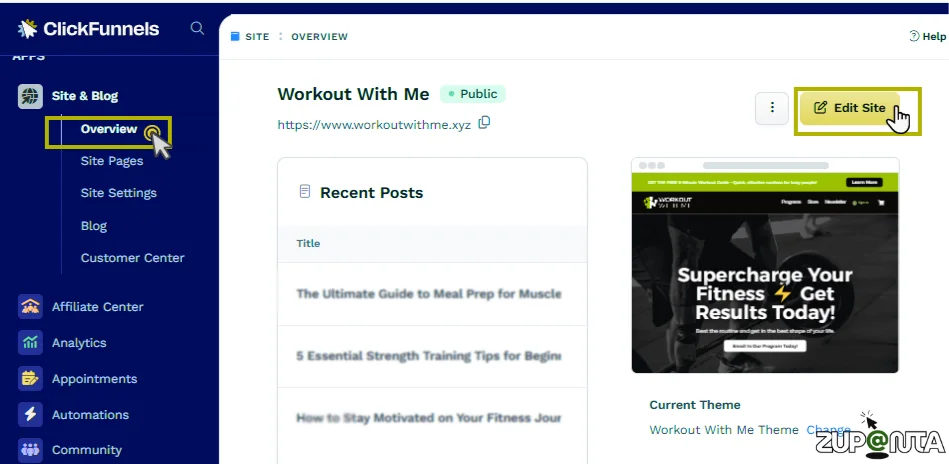
Those who want to change fonts, colors, or styles need to follow the process mentioned below.
- Click on the “Style Guide” button located in the left-hand menu.
- The left menu will further expand, and you will see the options:
- Fonts
- Colors
- Shadows
- Boarders
- Buttons
- Corner
- Customize these elements according to your brand color and theme.
5) Design the Header of Your Page
Once your theme is finalized, you need to go back to the page builder and, from there, start editing your page header.
For this, you need to hover over the header section that you want to edit and then click on the “Edit Block” button to edit the header.
6) Finalize the Landing Page
Once all the editings are done, you need to save your settings. Before you finalize the page, you should preview it.
For this, you need to click on the “Eye” icon located on the right side of the page settings and then save the settings.
7) Build Funnels
After finalizing your landing page, the next step is to connect it to a complete sales funnel. Open the Funnels section from your dashboard and create a new funnel based on your goal, such as lead generation or product sales.
Add your landing page as the first step, then connect the following pages, such as the sales page, order page, upsell page, and thank-you page, in the correct sequence.
Make sure each step is linked properly so users move smoothly from one page to the next. Set up your email follow-ups, enable payment integrations, and test the funnel before launching it publicly.
Once everything is working correctly, publish your funnel and start sending traffic to your landing page to generate your first sale.
Pros and Cons
Let’s know about what the pros are that I have experienced, and what the cons are that make this software not so good.
Pros:
All the Tools in One Platform
You don’t need different email marketing products to automate your campaigns. Use all the data in one place and grow your business without additional cost.
Free Trial
No need to pay first and then try the procedure. ClickFunnels is offering a free trial for all packages. Just sign up and start using the software without providing any credit card details.
A/B Testing
ClickFunnels’ A/B testing feature allows you to compare two or more versions of a page within your funnel to see which performs better. You can test different headlines, images, call-to-action buttons, layouts, or even entire pages.
Cons:
Not Easy for Beginners
If you are a beginner, then using ClickFunnels will require some training first.
Slow Software
The software is very slow, and it loads pages with a delay. I experience a lot of drag during the testing and when using it.
Lack of Customization
You are not free to stylize your landing pages.
Expensive
The prices are high compared to other brands.
ClickFunnels Customer Support
The support team at ClickFunnels follows a structured ticket-based system, which means every query is officially logged and tracked. This is useful for follow-ups, but it also means that real-time resolution is not always available.
During testing, the main challenge was not delays, but the fact that the first few replies from support felt very template-based and did not immediately address the specific issue being reported.
However, once the case was escalated, the assigned representative handled the situation in a professional and detailed manner.
The agent asked clear questions, investigated the problem properly, and provided a step-by-step solution rather than generic replies, which resulted in a satisfactory resolution in the end.
ClickFunnels Vs GoHighLevel
I have also written a detailed review of GoHighLevel that you can read on my blog. However, here is a quick comparison of both platforms.
Core Purpose
ClickFunnels
ClickFunnels is designed for building structured sales funnels and landing pages that guide visitors toward conversions. It offers a visual funnel builder, payment integrations, follow-up emails, and analytics.
GoHighLevel
GoHighLevel is built as a CRM and automation platform. It supports multi-channel marketing, lead tracking, appointment scheduling, and advanced workflows. It is also widely used by marketing agencies to manage multiple clients.
Comparison:
ClickFunnels focuses on conversion funnels. GoHighLevel focuses on long-term customer management and automation.
Key Features
ClickFunnels
- Drag-and-drop funnel builder
- Landing page templates
- Payment and checkout integrations
- Basic CRM
- Funnel analytics
GoHighLevel
- Full CRM system
- Email and SMS automation
- Sales pipeline tracking
- Appointment scheduling
- White-label SaaS features
Comparison:
ClickFunnels offers stronger page-building and funnel-focused design tools. GoHighLevel provides wider business management and CRM automation features.
Ease of Use
ClickFunnels
ClickFunnels is generally easier for beginners. The interface is designed for non-technical users building funnels.
GoHighLevel
GoHighLevel has a deeper learning curve due to advanced automation and CRM features. It suits users who need more complex workflows.
Comparison:
ClickFunnels is simpler for funnel creation. GoHighLevel requires more setup but provides greater control.
Best For
ClickFunnels
Best suited for entrepreneurs, e-commerce sellers, and course creators whose main goal is sales conversion.
GoHighLevel
Best suited for agencies, consultants, and businesses managing leads, communications, and clients in one platform.
Comparison:
Choose ClickFunnels for funnel-first marketing. Choose GoHighLevel for CRM-first operations and automation.
Cost
Both platforms are premium software solutions. ClickFunnels pricing can feel high for small users. GoHighLevel may offer more value for agencies because it allows multi-account management and white-label capability.
Comparison Summary
ClickFunnels is a high-converting funnel builder with strong page design tools. GoHighLevel is a CRM-focused automation platform suitable for businesses that manage multiple clients or complex workflows. The right choice depends on whether the primary need is funnel optimization or complete customer lifecycle management.
Final Verdict
ClickFunnels is clearly designed for entrepreneurs who want to manage funnels, marketing, payments, and analytics inside one unified system. It removes the need for multiple tools, which can simplify operations and reduce technical headaches.
This makes the platform highly suitable for entrepreneurs, agencies, course creators, and e-commerce brands that rely heavily on structured funnels to convert visitors into paying customers.
However, this platform is not the perfect choice for everyone. The pricing is on the higher side when compared with other tools in the market, and the learning curve can be noticeable for beginners.
The editing experience also feels slow at times, which can affect workflow speed. Users who only need a basic landing page builder or email marketing platform may find ClickFunnels to be more than what is required
