What is Brevo SMTP?

I have been using Brevo for more than 2 years, and I have used the Brevo SMTP service hundreds of times. With my testing and experience, I have discovered so many things that are worthy of disclosure.
So I decided to write about what Brevo SMTP is and why you should use it for your transactional emails. This guide will take you through the complete process of how to configure your SMTP server and much more.
What is SMTP?
An SMTP server sends email from one computer to another. SMTP stands for Simple Mail Transfer Protocol. It works like a post office for email. Your app or website talks to the SMTP server when it sends a receipt, a password reset, or a notification.
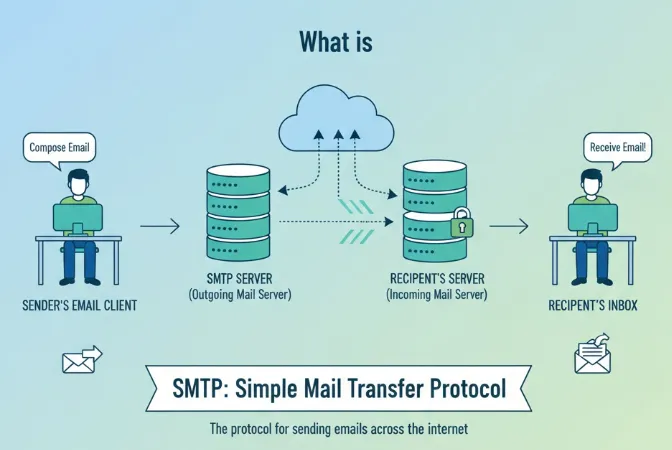
The server checks the sender and finds the right destination mail system. Good SMTP services let you send many messages fast. They report delivery, bounces, and errors. They also help keep your sending reputation healthy. Using a trusted SMTP server makes inbox delivery more likely. Brevo gives APIs and SMTP access for apps.
What is an SMTP Relay?
An SMTP relay sends email from your system to the inbox you want. Think of it like a courier for messages. You write an email, your app hands it to the relay, and the relay delivers it to the right mailbox. Simple.
I like to imagine a relay as a helpful friend who knows every street in the city. You give them a letter. They nod, smile, and say, “I got this.” Then they run and drop it at the right door.
Without a relay, your emails can get stuck or land in spam. With a relay, delivery feels smooth and safe.
For example, your website sends a password reset email. The relay grabs it and pushes it to Gmail or Outlook. Boom. The user sees it in seconds.
What is Brevo SMTP?
As I have explained earlier, SMTP is a relay that sends emails from one server to another. Similarly, Brevo’s SMTP is a relay SMTP server that helps you to send transactional or marketing emails to your users.
You can set the task like whenever a user purchases a product, send a receipt email to the user.
How to Send Transactional Emails Using Brevo SMTP?
You can use the Brevo SMTP to send transactional emails to your users. However, you need to have the following things ready before you start the process.
- Add and authenticate your domain in Brevo
- Design your email template
- Set your contacts or senders
1) Configure Brevo SMTP with a Plugin
The easiest way to connect your platform with Brevo SMTP is by using the Brevo plugin. You can read a complete guide on Brevo integrations to know what options are available for you.
Let’s suppose you are using WordPress, then go to the “Plugins” section and look for the “Brevo SMTP” plugin and install it.
Now use this plugin to configure your transactional emails with Brevo SMTP.
2) Configure Brevo SMTP With the Manual Method
In case your CMS does not support the Brevo SMTP plugin, you need to configure it manually. Here are the steps to take.
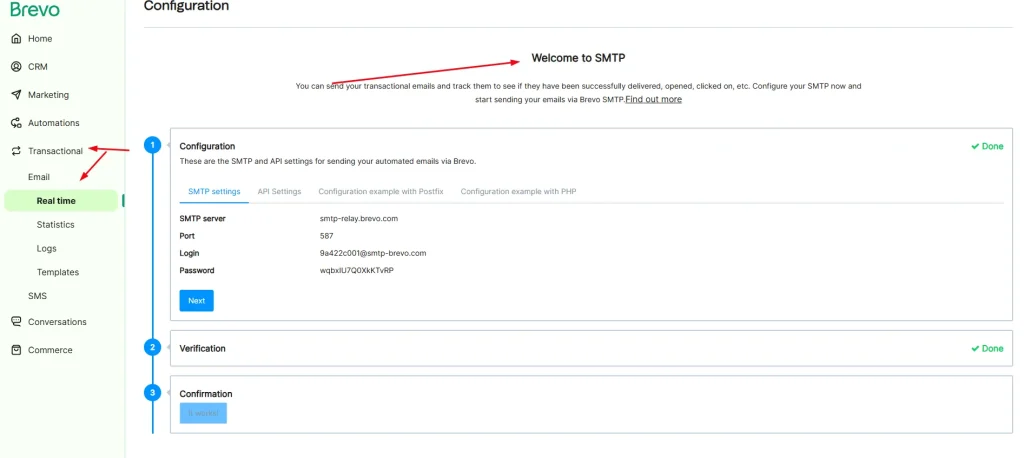
Open your Brevo dashboard and go to the “SMTP” section. Now get your SMTP credentials from this page.
Now you need to configure your SMTP settings on your website. Here are the settings:
- SMTP server: Write smtp-relay.brevo.com.
- SMTP user: Provide your SMTP login username.
- SMTP password: Enter your SMTP key here.
- Port: Here, you need to pick a port to send emails using it.
- Encryption: Leave this section.
3) Send Your Transactional Emails with Brevo SMTP
Now the fun part. You set everything already, so it is time to send real emails.
Open your website or app area where you trigger messages. This could be an order confirmation, a sign-up form, or a contact form. Send a test email first. Always test. It saves headaches later.
If your email lands in the inbox, smile. It feels good. If it goes to spam, do not panic. Check your SMTP login, key, and port again. Also, check if you verified your domain. Most mistakes happen there.
Once everything works, let your system send emails automatically. For example, a user buys something. The system sends a receipt. The user gets it in seconds. Clean and smooth.
Monitor Your Progress
Lastly, you need to monitor your progress from the Transactional > Statistics or Logs pages. On this page, you can get all the helpful stats like click-through rates, open rates, and failure rates, etc.
Why Should You Use an SMTP Service for Your Email Marketing Campaign?
You should use an SMTP service because it makes email delivery strong and reliable. Your normal web host cannot handle big email sending. It can fail or send slowly. An SMTP service sends fast and keeps your emails safe from spam folders. It also tracks opens, clicks, and bounces. That data helps you learn and improve your campaigns.
Think of SMTP as a strong delivery truck. Your website is a bike. A bike helps in short trips, but a truck handles heavy work. If you send newsletters, offers, or updates, use SMTP. It protects your reputation and keeps your audience happy.