How to Create & Use Brevo API Key?

A Brevo API key works like a safe code for your marketing tools. With this, you can connect your website or app with Brevo. With the help of this connection, you can perform tasks like sending automated emails and managing your contacts without any issues.
You can easily set up a Brevo API key and use it with third-party platforms like WordPress, Shopify and WooCommerce.
You only need a free Brevo account and a simple guide to create your first API key. You will also learn about how to delete this key if you have forgotten it.
What is an API Key?
An API key is a unique code that gives a program permission to connect with another service. Think of it like a door key. You hold it, and it lets you enter a specific system without asking again and again. When you use a tool or website that wants to talk with another platform, the API key proves your identity and keeps the data safe.
For example, if your website wants to send emails through Brevo, you enter your API key in your plugin or tool. The key tells Brevo, “This request is from you, and you are trusted.” So your website can send emails, add contacts, and pull data without problems.
API keys also protect your account. If someone else gets your key, they can use your services without permission. This is why you must keep your key private. Do not share it. Do not post it online. If the key leaks, you can delete it and make a new one.
How to Get API Key from Brevo?
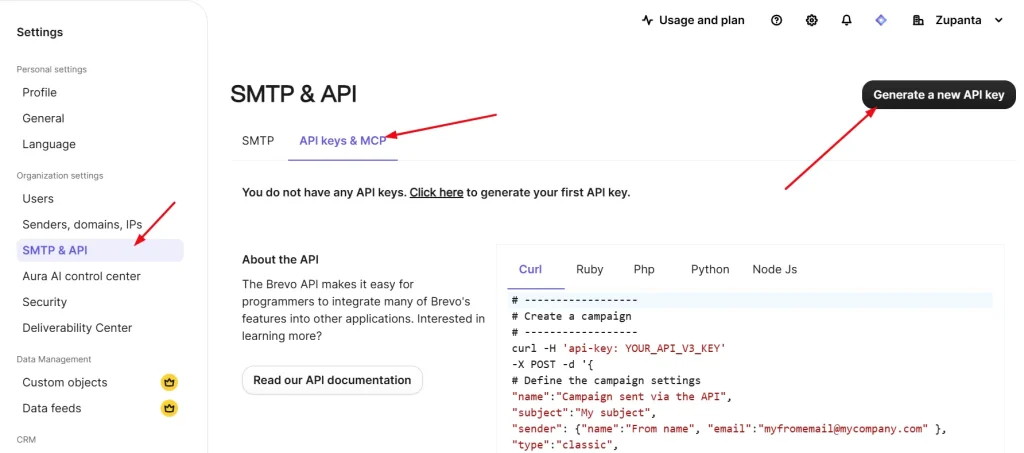
Brevo cares about your privacy so the API keys are not visible on your Brevo account dashboard. Also, your API key is located at the “API keys & MCP” section but you can only see the last few digits of your key for safety.
You should keep your API key in a safe place like a ledger or a USB. However, if your API key is lost or you forgot it then you can create a new key anytime.
Let’s find out how you can create a new API key from your Brevo account.
Create Brevo API Key
You need to have an API key from Brevo if you want to integrate Brevo with your app or website. So here is how to get it.
Note: Brevo sends a confirmation email to your registered email whenever an API is created or deleted. This makes your API safe and secure.
Log in to your Brevo account and go to “Settings” on the left sidebar.
Now look for “SMTP & API,” then select “API keys & MCP.”
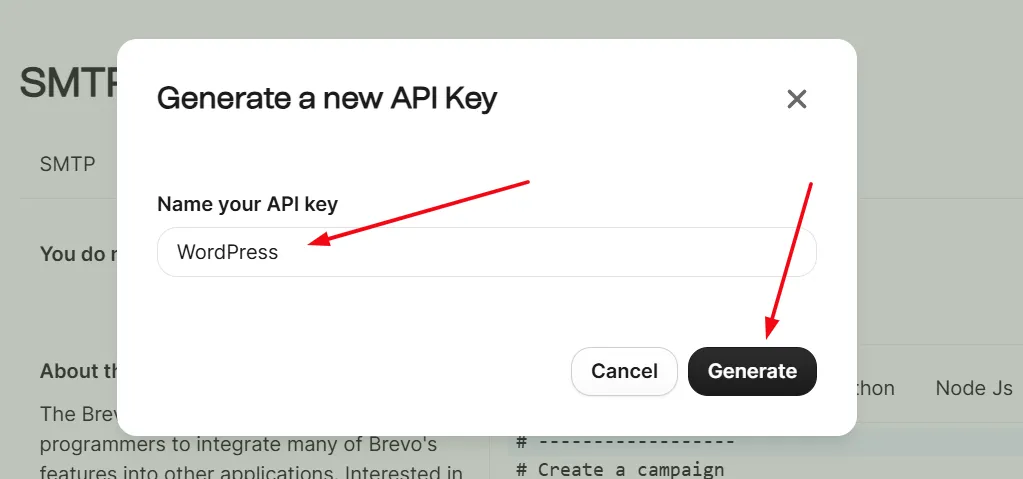
In the upper right corner, you will see the black button labeled “Generate a new API key,” so click it.
Now, a new pop-up will appear and ask you to “Name your API key”. So write a name like WordPress or Shopify. Always name the API according to what you are using it for.
Your API key will appear on your screen for one time only. You need to copy and save it to a secure place.
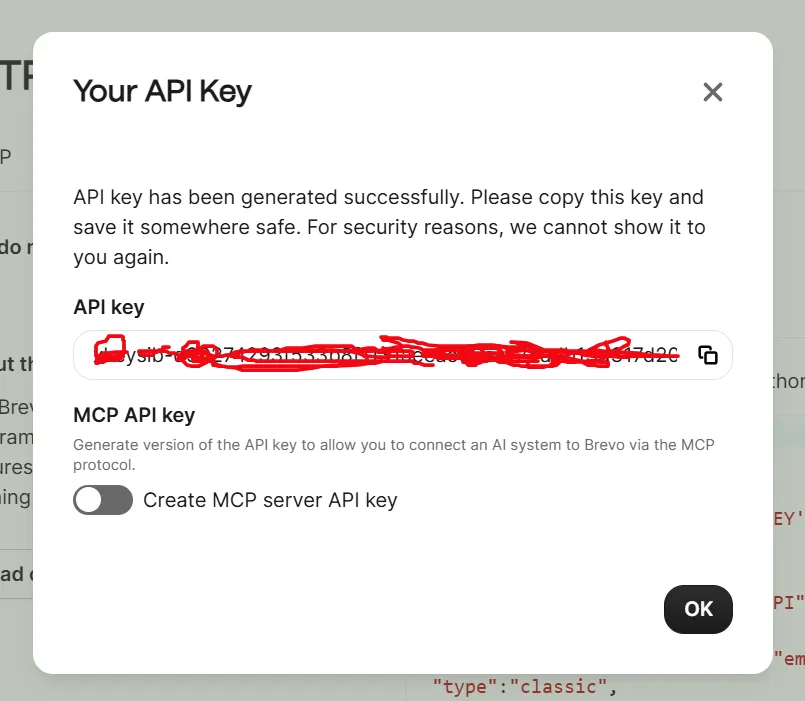
Once you have copied and saved the key, you need to click on the Ok button, and that’s it.
What Are the Applications of the Brevo API Key?
A Brevo API key gives your site and apps a direct link with Brevo. It lets your system send email data, manage contacts, and run marketing actions without manual work. Each use plays an important role in making your online setup fast, clean, and smart. Here are the main applications in simple words.
1. Send Emails From Your Website or App
Your API key allows your system to send emails through Brevo. You can send order emails, signup confirmations, welcome notes, and password reset messages with ease.
Each request goes through your key, so only your system can send these emails. This keeps your messages safe and fast. It also gives your users a smooth experience and builds trust because they get the right emails at the right time.
2. Add and Manage Contacts
Your API key lets your site send new contacts to your Brevo list as soon as someone fills out a form. The details move straight into your account without extra steps.
You can change contact info, tag users, or shift them to other lists based on what they do. This keeps your data fresh, saves you time, and makes sure your contact list stays neat and organized.
3. Trigger Automation Workflows
Your API key can also start automated actions. When someone creates an account, your site can send a welcome sequence right away.
If a customer makes a purchase, it can trigger follow-up messages without you doing anything. This keeps people engaged and active while your system handles the work in the background.
4. Track Email Activity and Events
Your API key also lets your system track email activity. You can see who opened your email, who clicked a link, and if any message bounced or went to spam.
All this information appears in your plugin or Brevo dashboard, so you can check results and understand how people interact with your emails.This helps you understand user actions and improve your email plan based on real behavior.
5. Connect Third-Party Tools
Many plugins and tools support Brevo. Your API key lets them talk with your account. This gives you more control and makes your setup flexible and strong.
How to Delete My Brevo API Key?
If you have forgotten your API key or it has been revealed to the public then you need to delete it. Here are the steps.
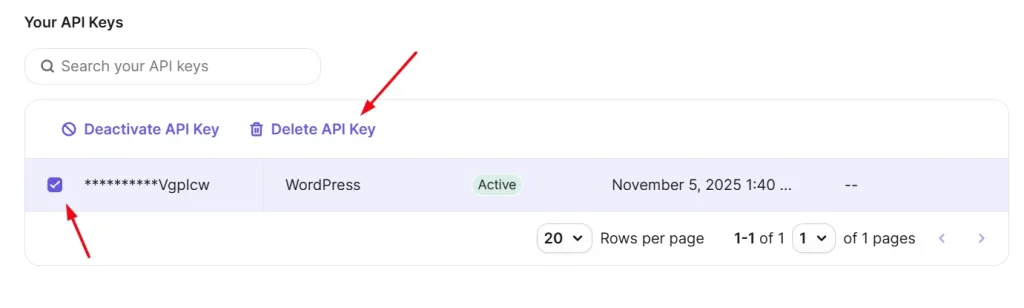
- Go to the “SMTP & API” section.
- Check out for your key that you need to delete.
- Select the key and click on the “Delete API key” button at the top and that’s it.