MailerLite Review – Pros, Cons, Pricing & Analysis

MailerLite has gained popularity in a short time. I still remember that when I first tried this tool, it was a no-brainer for me to choose it for my projects. However, the old version is now called “MailerLite Classic” because the company has launched a new version of this email marketing tool.
It was first launched in 2010, and I started testing MailerLite in 2022 to see if it’s really as easy and powerful as people say. Since then, I have used this tool for many of my projects. I also use Brevo and Flodesk, but MailerLite is also a good choice for small businesses.
With 3 years of experience, I have prepared this MailerLite review. Here’s what I liked and what I think MailerLite still needs to improve.
Summary of My MailerLite Review
What is MailerLite?
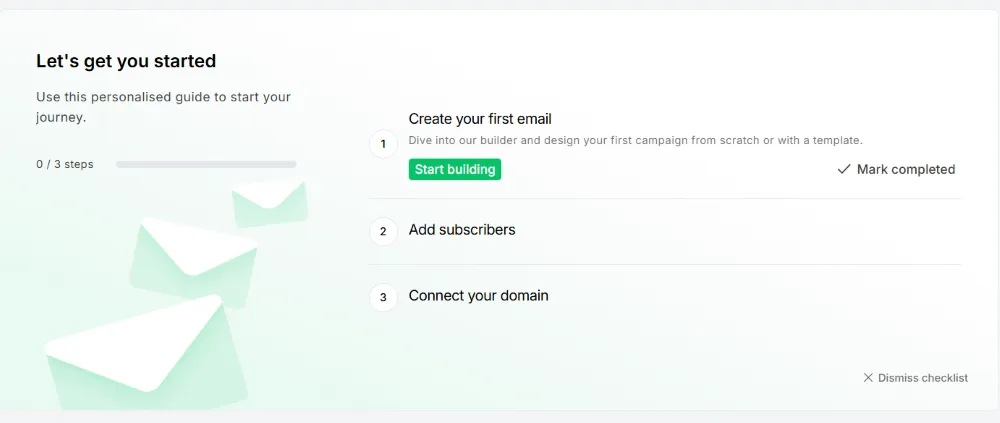
MailerLite is an email marketing platform that helps you create emails, landing pages, pop-ups, and automation without any knowledge of programming or coding. It is an easy-to-use email marketing solution that lets you send newsletters to your users.
MailerLite Pricing
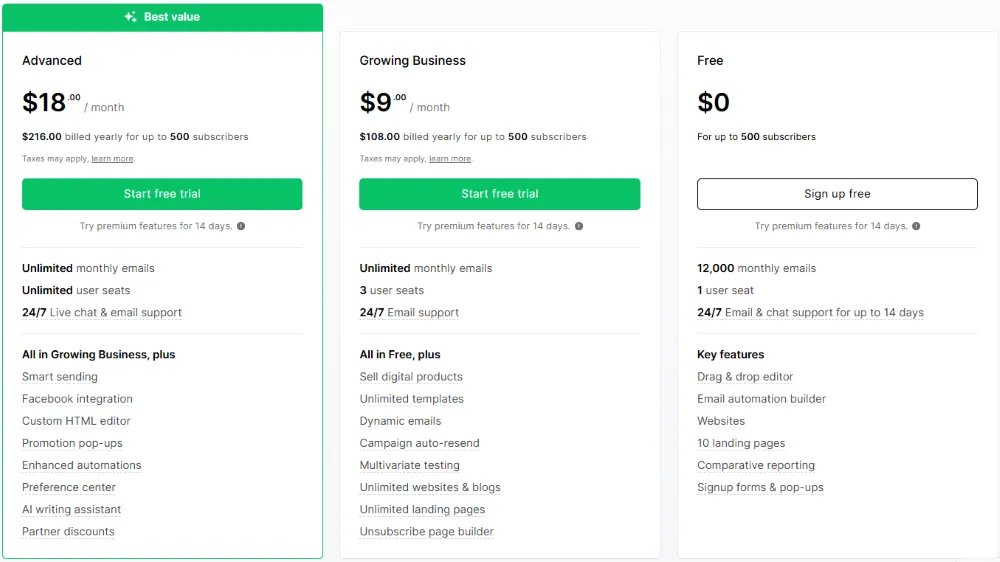
Now, have a look at the current pricing of MailerLite.
| Plan | Monthly Price | Best For | Key Features |
| Free | $0 | Beginners and small projects | • Up to 12,000 emails per month• 1 user seat included• Email & chat support for first 14 days• Drag-and-drop editor• Basic email automation• Create websites & 10 landing pages• Signup forms & pop-ups• Basic reports |
| Growing Business | $10 | Small businesses & creators | • Unlimited emails• 3 user seats• Full-time email support• Includes all Free plan features plus:• Sell digital products• Unlimited templates• Dynamic emails & auto-resend• A/B testing• Unlimited websites & landing pages• Custom unsubscribe pages |
| Advanced | $20 | Growing companies & agencies | • Unlimited emails & users• 24/7 live chat & email support• Everything in Growing Business plus:• Smart sending• Facebook Ads integration• Custom HTML editor• Interactive pop-ups & promos• Advanced automation• AI writing assistant• Partner discounts |
| Enterprise | Custom | Large businesses (100K+ subscribers) | • Unlimited emails & user seats• Priority live support• Dedicated success manager• Onboarding & training sessions• Account audit & optimization• Dedicated IP & deliverability consulting• High-scale performance tools |
My Experience with MailerLite (Detailed Review of All the Features)
UI & Ease of Use: (5/5)
First things first. I really liked the user interface as it loads fast and you can access all the main tools from the dashboard. The menu on the left side provides all the builders, apps, account settings, and automation tools. My experience has been very good so far, thanks to the drag-and-drop interface.
Free Plan: (5/5)
I like MailerLite’s free plan option that helps new users try this tool, and there is no credit card required for sign-up. The free plan includes the following features:
- Send 12000 emails per month
- You can add up to 1000 subscribers
- Drag and drop editor
- For 1 user
- Automation builder
- Create landing pages, websites, and blogs
However, if you are looking for advanced features like A/B testing or sending unlimited monthly emails, then you need to try paid plans. But for newcomers, the free plan offers almost all the stuff that they need.
Drag and Drop Editor (4/5)
The drag-and-drop builder saves time. You can create A/B split, auto-resend campaigns, RSS feed, and much more with this builder.
Note: Before you start your email campaigns, you need to verify or authenticate your domain from your account settings. This process involves the knowledge of DKIM and SPF authentication.
This is the only thing that I don’t like about this builder. However, almost every email marketing platform requires you to use these processes to authenticate your domain.
Email Campaigns: (3.5/5)
You can use MailerLite to send transactional emails, newsletters, promotion pop-ups, and surveys, in the free forever plan. However, you can not send SMS, mobile push, web push, or live chat support.
Email Marketing Automation: (3.5/5)
Automated workflows are pretty impressive with MailerLite. You can use 15 different types of email automation templates and workflow editors. These editors are easy to use and help you create workflows based on email open and clicks on the links.
You can test different subject lines and email versions inside your automated campaigns. This helps you see what works best and improves your results.
But it does not offer some advanced automation tools like lead scoring and website tracking. It also has no CRM automations, such as moving deals to the next stage or changing the deal owner.
Templates Design Testing: (4.5/5)
I used dozens of email templates, and they are perfect for small businesses. There are almost 100 ready-to-use email marketing templates that you can use for your next campaign. However, most of them are locked in paid plans.
Also, you can design your content elements and save them to use them again anytime. You can also use the global styles option that allows you to apply the same colors and fonts to all the new templates automatically.
Form Builder: (4/5)
MailerLite’s form builders allow you to create sign-up forms, embedded forms, and pop-up forms. The builder is very easy to use and manage. You can use the pre-designed templates with customization options.
And here is the thing, you can use the A/B testing for your forms. This helps you to find the version that brings the most signups and improves your conversions. I personally used this feature a lot of times and got amazing results. As compared to other tools, MailerLite provides better landing page templates.
Customer Support: (4/5)
MailerLite’s free plan only has a 14-day limited personal support. However, with an advanced plan, you can get access to the email support or live chat that is very cooperative and available all the time.
I always get a response within 5 minutes when I contact customer support. I suggest that MailerLite add phone call support as well. Moreover, you can use the knowledge base to get complete guides on different task operations.
Overall Rating: (4.19/5)
MailerLite is perfect for small businesses, individual creators, and charitable organizations. It features a simple, fast interface with an easy drag-and-drop editor. The free plan offers automation, landing pages, and email templates. Its form builder, A/B testing, and helpful support enhance efficiency, while advanced automation and SMS tools are available in paid plans.
However, if you are looking for an email marketing software that provides CRM friendly tools, detailed reporting, or AI features, then you can opt for Brevo or Flodesk.
So this is my personal experience with the MailerLitre. I have used and tested it for a couple of years, and this review is a summary of my testing and derived results. I would suggest you use this tool even with a free plan if you are running a small organization.
MailerLite Advanced Features
Let’s have a look at some advanced features of MailerLite. However, I have already shared my MailerLite review above, but this is a detailed explanation.
Automation Tools
For me, automation is a must-have tool for any email marketing strategy. It allows me to send welcome emails, new posts, or product launch emails, and weekly newsletters without any issues.
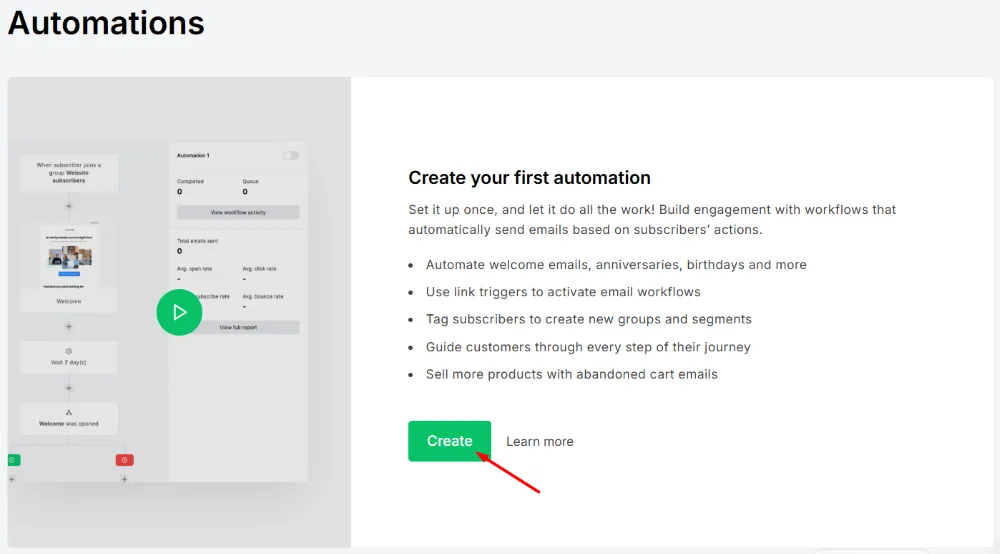
However, MailerLite has all the things that an email author needs. So how do these automated workflows work? Let’s have a closer look.
You need to choose a trigger action, like when a user clicks on a link in the email, a new visitor subscribes to the newsletter, or adds an item to the cart, before you start the automation.
Using this tool requires no additional knowledge or skills. It is very easy and you can use it in just a few clicks. Just click on “Automation” on the left sidebar and choose the “Automations” option. It will ask you to create a new automation.
You can start from scratch or choose from the existing templates. You can test this automation or activate it right away.
Signup Forms & Landing Pages
Sign-up forms are the first thing where the user becomes your subscriber. You need to create a sign-up form that should be appealing and attractive. With MailerLite, you can create multiple automation triggers based on forms. Here are the types of forms that you can create with MailerLite:
Pop-up Forms:
A pop-up form is a small window or box that appears on a website to capture visitor information, usually an email address. According to the Pop-up statistics, the average conversion rate for a pop-up is around 11.09%.
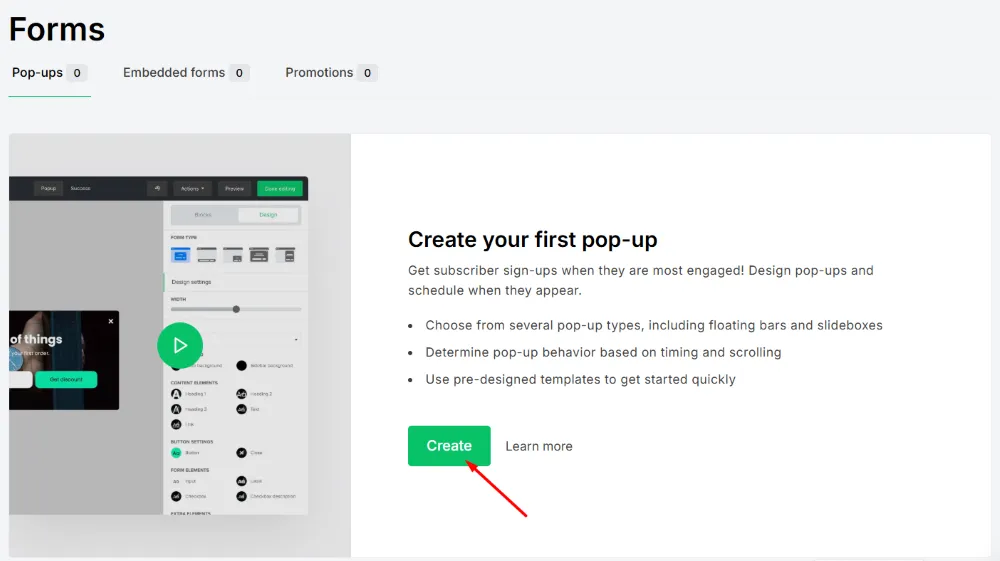
To make a pop-up form, you need to choose a name for your form, then pick the pop-up option from the available options. Now choose the groups and template and activate the form. You can also customize the form fields.
Embedded Forms:
If you need to use embedded forms, then you can create them with MailerLite. These are the forms that do not pop up on your website, but they appear inside the page.
Promotions Forms:
These are the promotion pop-ups that only appear on the screen when the user performs a specific task. These can also be time-sensitive banners and will appear from multiple triggers. However, this is not available on the free version.
Landing Pages:
MailerLite lets you create a single landing page or a complete website. Use the website builder to create a page with a custom HTML editor. However, if you need to use a custom domain, then only the paid plan allows you to do it.
However, I personally like to use it with WordPress websites and haven’t used this website’s HTML editor many times.
In short, the forms are easy to create, and options like managing forms with interest groups, creating privacy policy forms, and adding a reCAPTCHA checkbox are very beneficial.
Deliverability
Now, let’s discuss deliverability. MailerLite performs very well in getting emails into inboxes. Its setup guides and tutorials make email authentication easy, improving inbox placement. This also boosts your sender reputation, ensuring future campaigns are more likely to reach subscribers reliably.
Drag-and-Drop Email Editor
The drag-and-drop email editor allows you to create stunning and attractive emails in seconds. You can grab the attention of your customers with these emails.
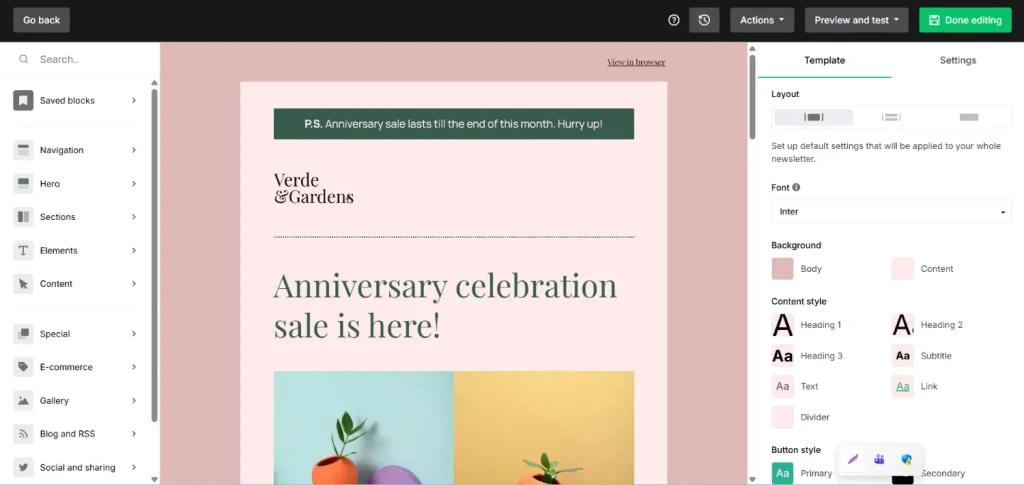
However, not only that, you can add social media posts like Facebook posts to your email directly. This is an amazing feature for people like me who are running e-commerce stores and can showcase products inside the email.
Reporting & Analytics
MailerLite’s reporting makes it easy to track how your campaigns perform, with clear insights on open rates, clicks, and subscriber activity. The click maps are especially helpful to see which links get the most attention.
On the downside, the analytics are quite basic compared to other email marketing platforms, and there’s no dedicated tab for detailed reports, so getting in-depth campaign data can feel slow and a bit limited for advanced marketers.
Integrations
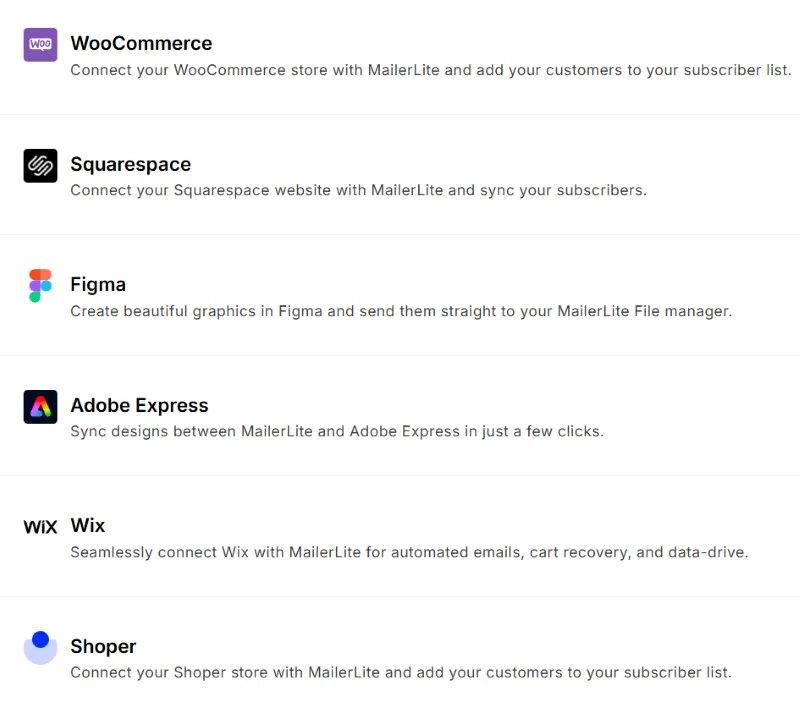
When it comes to integrations, MailerLite offers 140 compatible integration options. Some of the most popular options are:
- WordPress
- Shopify
- WooCommerce
- Social Media networks like Facebook integration
- Wix
So this is a complete solution if you are looking for an email marketing platform with premium features and integration options.
Customization
You can customize your subject lines according to your needs. MailerLite also lets you add dynamic content blocks to your emails, making it easy to create personalized offers for each subscriber.
Pricing Experience
Well, price is what makes MailerLite a perfect email marketing platform. If you want to stick with a free forever plan, then you have an option always open. However, plans like the Growing Business plan only cost you $10 per month with features, 1K contacts, unlimited emails, hundreds of newsletter templates, and much more.
Whereas the Advanced paid plan pricing is $21 per month, and it serves you with some premium features like a custom HTML editor, multiple automations, RSS campaign, and promotion pop-ups.
People who rely heavily on custom features can opt for custom pricing as well. So, in short, the pricing is quite affordable and impressive. This is the best choice for those who have a small to medium budget and have started a new business.
So these are MailerLite’s features that I have personally used and tested so many times. The creation process of this review is very interesting for me, as I really enjoyed writing and sharing my honest review with you guys. Below are my personal likes and dislikes about this tool.
What I Liked Most
So in the end, here are my likes and dislikes about MailerLite.
What I Didn’t Like
About MailerLite Company
MailerLite was founded in 2010, but the company launched in 2005 with the name “Itema”. It was a website builder and designer company at that time. However, in 2009, the company launched an email newsletter tool called “Mailer.lt,” which was a separate project at the time.
Later in 2010, the company’s name was changed to “MailerLite”. Gradually, MailerLite started to focus only on the email marketing services.
In 2022, MailerLite was acquired by Vercom, which is a Polish cloud computing company, for EUR 84 million. Today, the company has its headquarters in San Francisco, USA.
MailerLite Alternatives Email Marketing Software
I have tested dozens of email marketing tools, and MailerLite is one of them that impressed me. However, there are some other tools that you can use as an alternative to MailerLite.
Mailchimp:
Mailchimp offers many features for beginners and pros. You can design emails fast and track your results easily. It also gives strong automation tools for growing your audience.
Brevo:
Brevo gives a clean dashboard with helpful reports. You can send emails, SMS, and WhatsApp messages from one place. It works well for businesses that want an all-in-one system.
Flodesk:
Flodesk focuses on beautiful email designs. You can build clean layouts without any tech skills. It works best for creators who want simple tools and stylish templates.
Final Verdict
After using MailerLite for years, I can say that this tool works very well for my projects. I like its clean dashboard and quick builders because they save my time. The free plan also helps a lot when I test new ideas for small clients. I enjoy the automation tools, landing pages, and reports because they keep my work simple and smooth.
For me, MailerLite is a solid choice for small and medium businesses. It fits well for new creators, growing companies, and anyone who wants good features without paying too much. I have tested many tools like Brevo and Flodesk, but MailerLite still feels stable and comfortable for regular use.
Yes, there are a few things that I don’t enjoy. Some advanced templates only work on paid plans, and you need to complete website verification before full approval. But these points are not big issues for me because the tool gives good value and strong performance.
If you want an affordable and easy email marketing software, I strongly suggest trying MailerLite. You will enjoy it if you like simple tools that work fast and help you grow without stress.